For Mac & PC | Standalone App • VST3 • AUv3 • AAX Plugin
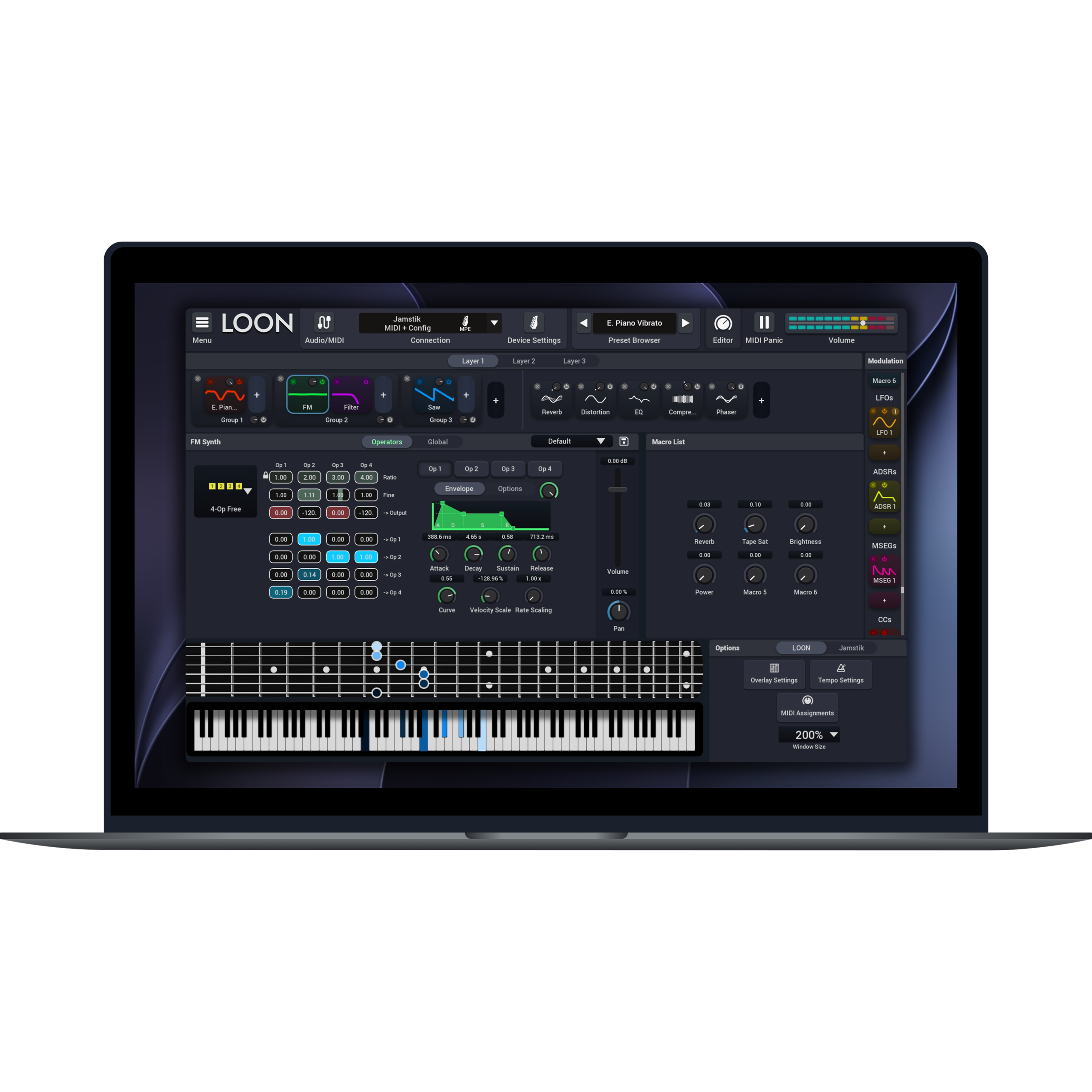
LOON is a software instrument built for modern music production.
Build expressive instruments by combining oscillators, sampled instruments, FM synthesis, effects, and modulation in a single intuitive workflow. Start with over 200 factory presets created by the Jamstik team and artist partners, then customize them to fit your sound. Designed to fit seamlessly into your workflow, LOON offers broad MIDI controller and DAW compatibility while balancing deep customization with an approachable interface.
LOON is included with Jamstik MIDI Guitar purchases and can be downloaded at jamstik.com/LOONDownload
LOON by Jamstik
Sale price$ 49.99Regular price$ 99.99
LOON
Overview
Video
One Instrument
Multiple Signal Paths
Build complex sounds by combining simple, independent layers. From clean and controlled to dense and expressive.
Each layer has its own dedicated instrument and FX panel.
Build in parallel, then blend everything together.
Build Inside Each Layer
Combine multiple sound sources into instrument groups.
Stack basic synthesis, samples, FM, and a filter,
Process Per Layer
Each layer has its own FX chain.
Shape sounds independently before they come together.
Control Everything At Once
Map key movements across layers and groups to macros.
Turn complex changes into a one-knob solution.
Every Note Has A Voice
By utilizing deep modulation & MPE capabilities, each note can respond independently—like strings on a guitar. Expression becomes part of the sound itself.
Yes. LOON can be used as a standalone application or as a plugin inside your favorite DAW. It supports VST3, AU, and AAX formats (like Pro Tools), making it compatible with most modern music production software.
Can I use LOON without a DAW?
Absolutely. LOON runs as a standalone application, so you can play and explore sounds without opening a DAW.
Do I need a Jamstik MIDI guitar to use LOON?
No. LOON works with any MIDI controller, including keyboards, pad controllers, wind controllers, electronic drums, MIDI guitars, and other compatible MIDI devices.
Will my Jamstik Creator sound packs work in LOON?
Yes. Sound packs you've previously downloaded for Jamstik Creator are fully compatible with LOON.
Does LOON support MPE?
Yes. LOON supports MPE (MIDI Polyphonic Expression) for compatible controllers, allowing expressive performance with per-note pitch bend and other expressive controls.
Can I automate LOON in my DAW?
Yes. LOON's macros can be automated within compatible DAWs for dynamic performances and evolving sound design.
Will there be future sound packs?
Yes. We're planning to release additional sound packs and content over time.
Can I use LOON on multiple computers?
Yes. We currently allow a license to be used across multiple computers. However, if we detect abuse, we may deactivate a license.
Where is the sound library stored?
By default, on Windows the location is:
C:\ProgramData\Jamstik\LOON\Sound Library
On Mac, the location is:
/Library/Jamstik/LOON/Sound Library
You have the option to change the location before installing the sound library.
Can I import my own samples?
LOON does not currently support user sample import.
Does LOON require an internet connection?
LOON does not require an internet connection. However, you will need to be connected to the internet to install the sound library, sound library updates, and software updates.
Can I resize the interface?
The interface is fully scalable.
Does LOON support high-DPI/Retina displays?
Yes.
Is there a free trial?
In Lite mode, you have full access to the preset browser, device config, and add-on content like expansions and imported presets. However, you cannot access the Edit view without registering a valid license or connecting a supported Jamstik guitar. We do not currently offer a trial of the Edit view.
How often is LOON updated?
We intend to support LOON with major feature updates at least once per year, with patches and smaller improvements in between.
System Requirements
MacOS
Minimum Requirements: - Intel Core 2 Duo Processor (*2.1 or higher*) - 4 GB of RAM - Mac OSX 10.13 (*High Sierra*) - 50 MB free hard disc space for installer (7.5GB for Sample Library)
Recommended Requirements - Intel Core i5 Processor (*2.5 or higher*) - 8 GB of RAM or more - Mac OSX 10.15 (*Catalina*) - 50 MB free hard disc space for installer (7.5GB for Sample Library)
Windows
Minimum Requirements - Intel Core 2 Duo / AMD Dual-Core - Processor (*2.1 or higher*) - 4 GB of RAM - Windows 7 - 50 MB free hard disc space for installer (7.5GB for Sample Library)
Recommended Requirements - Intel Core i5 / AMD Ryzen 5 Processor (*2.5 or higher*) - 8 GB of RAM or more - Windows 10 - 50 MB free hard disc space for installer (7.5GB for Sample Library)